Lists
In this tutorial we will learn how to use dynamic C# lists to keep track of our asteroids.
C# Lists
When managing data within interactive media art or games, we often need to have lists of objects. We can use these lists to keep track of objects in our scenes. Typically lists of objects are handled with arrays.
However, within C#, arrays always have a fixed length. Meaning, if we create an array of integers with a length of 5:
int[] numbers = new int[5];
That array length will always be 5. This can work in some situations, but, for our project, where we want to keep track of a dynamically changing amount of asteroids as they are instantiated and destroyed, we need to use an ordered list format that can be dynamically updated.
Within C# we and use List<T>. Lists mange resizing automatically and allow us to add and remove items to a list as needed.
Within this tutorial we will use a list of asteroids to keep track of the asteroids within our scene. We will add asteroids to the list when they are instantiated and remove asteroids from the list when they are destroyed. When all asteroids are destroyed, and our list has zero objects, we will create a new set of asteroids.
Creating a List
To begin creating a list, we first need to import the System.Collections.Generic namespace. This will allow us to get access to the List<T> class.
using System.Collections.Generic;
using UnityEngine;

public class GameManager : MonoBehaviour
{

//...
Then we can create a public List<T> variable named asteroidList. To create a List<T> variable, we need to provide the type of object that will be in our list within the carrot <> brackets. Since we want a list of our asteroid game objects, our list will be of type GameObject. Additionally we need to set our List<T> variable equal to new() to create a new List<T> object.
public List<GameObject> asteroidList = new();
Add and Remove Methods
Once we have our list, we can write some methods to handle adding and removing asteroids from our asteroidList. We’ll make two methods that each take in a game object parameter:
void AddAsteroid(GameObject asteroid)
{

}

void RemoveAsteroid(GameObject asteroid)
{

}
Within C#, the syntax for parameters begins with the type of object followed by a local variable name that can be used within the scope of the method.
Within these methods, we can use the List<T>.Add() and List<T>.Remove() methods to add our asteroid parameter to our list:
void AddAsteroid(GameObject asteroid)
{
    asteroidList.Add(asteroid);
}

void RemoveAsteroid(GameObject asteroid)
{
    asteroidList.Remove(asteroid);
}
Adding and Removing Asteroids
Now that we have our AddAsteroid() and RemoveAsteroid() methods, we need to implement these methods within our GameManager script.
For adding asteroids, we can call AddAsteroid() in our SpawnAsteroids() method following the instantiation of an asteroid. In order to pass our new asteroid object to our AddAsteroid() method, we need to store our newly created asteroid in a GameObject variable. We can call this variable newAsteroid:
void SpawnAsteroids()
{
    for (int i = 0; i < asteroidsToSpawn; i++)
    {
        GameObject newAsteroid = Instantiate(asteroid, GetRandomAsteroidPosition(), Quaternion.identity);
        AddAsteroid(newAsteroid);
    }
}
To remove our asteroid from the asteroidList, we can call the RemoveAsteroid() method right before an asteroid is destroyed. Currently, an asteroid destroys itself after colliding with a Projectile game object. Therefore, we can call the RemoveAsteroid() method within our Asteroid.cs file. To do this, we first need to make sure that our methods for adding and removing our asteroids are public. Technically, we only need to make our RemoveAsteroid() method public, but we’ll need to access AddAsteroid() in later tutorials so let’s change it to public now as well. Making a method public changes the methods protection level allowing other scripts to access that method:
//added public keyword before method
public void AddAsteroid(GameObject asteroid)
{
    asteroidList.Add(asteroid);
}

public void RemoveAsteroid(GameObject asteroid)
{
    asteroidList.Remove(asteroid);
}
Once our methods are public, we can then access our RemoveAsteroid() method in our Asteroid.cs file by first accessing the GameManager class, then the instance variable, and finally our RemoveAsteroid() method. We will call this in our OnTriggerEnter2D method right before our asteroid is destroyed. We can provide the RemoveAsteroid() with the value gameObject which is equal to the game object the Asteroid component is attached to. When we call this method, our game manager will search for that asteroid within our asteroid list and remove it from the list.
// Asteroid.cs file

private void OnTriggerEnter2D(Collider2D collision)
{
    if (collision.CompareTag("Projectile"))
    {
        GameManager.instance.RemoveAsteroid(gameObject);
        Destroy(gameObject);
    }
}
Testing Asteroid List
When we play our game, we should now see our asteroids in our Asteroid List property in the Game Manager component. We should also see our asteroids being remove when they collide with a projectile:
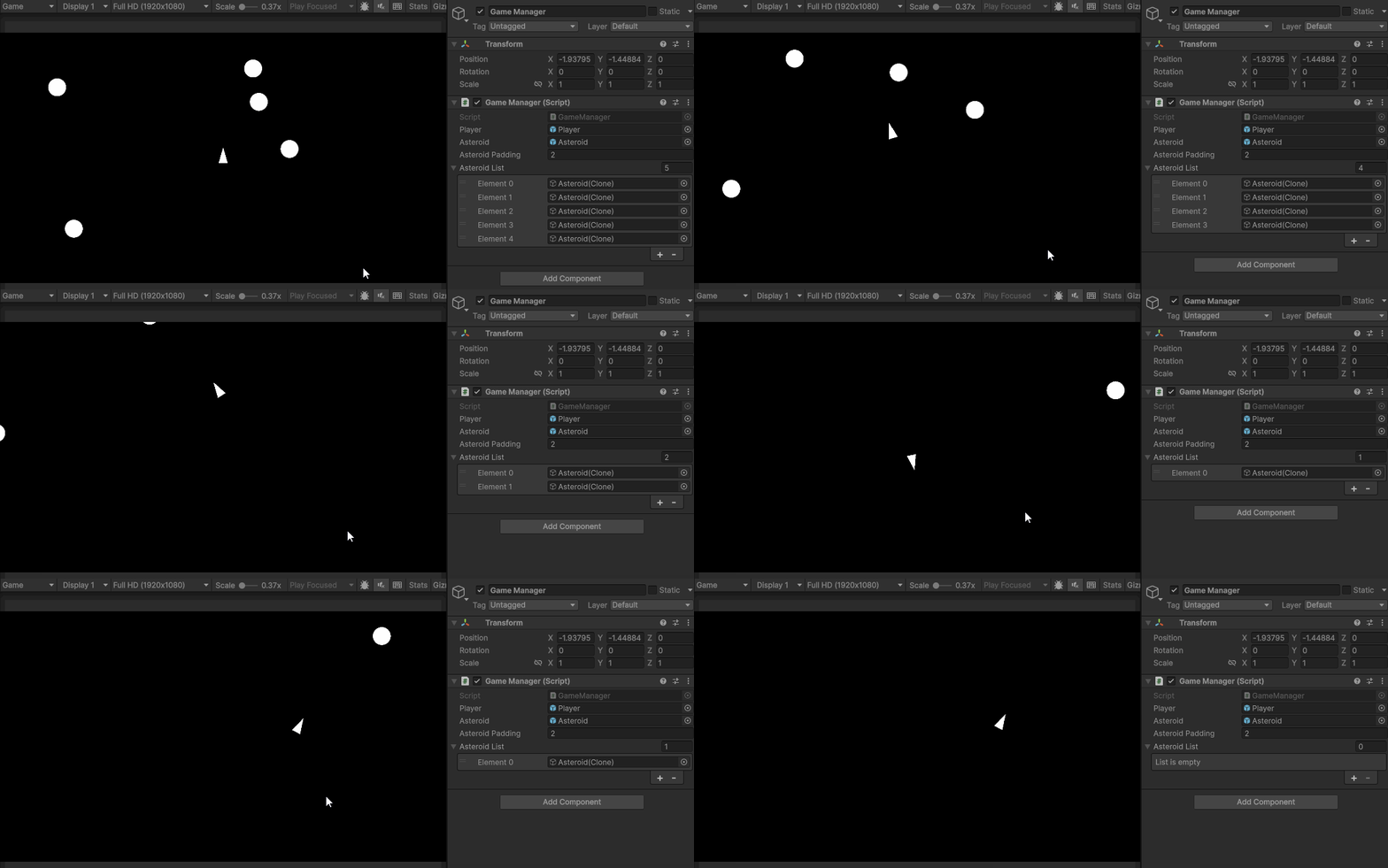
Increasing Difficulty
As a last step, let’s write some code to spawn a new wave of asteroids when all of them have been destroyed. We can additionally increment our asteroidsToSpawn variable each time our list is cleared.
To know when all of the asteroids have been destroyed, we can use the List<T>.Count variable to check the number of asteroids in our list. When this list is equal to zero, we can spawn new asteroids. We can add this logic to the RemoveAsteroid() method:
public void RemoveAsteroid(GameObject asteroid)
{
    asteroidList.Remove(asteroid);
    if(asteroidList.Count == 0)
    {
        asteroidsToSpawn++;
        SpawnAsteroids();
    }
}
Now when we play our project we will see a new wave of asteroids spawn after the previous wave is destroyed.
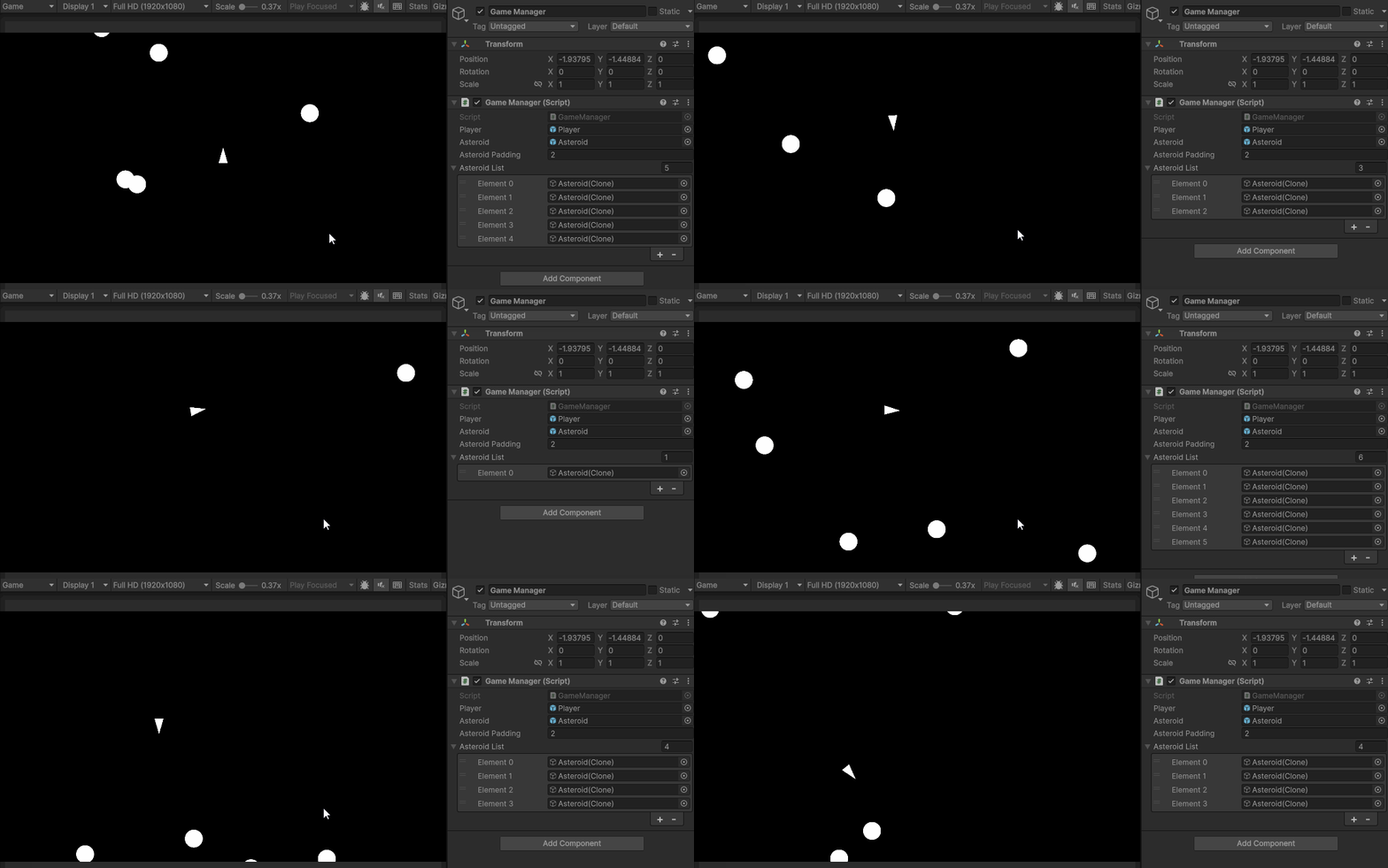
At the end of this tutorial your GameManager.cs and Asteroid.cs file should look like this:
using System.Collections.Generic;
using UnityEngine;

public class GameManager : MonoBehaviour
{
    public static GameManager instance;

    public GameObject player;
    public GameObject asteroid;

    int asteroidsToSpawn = 5;
    public float asteroidPadding = 2;

    public List<GameObject> asteroidList = new();

    private void Awake()
    {
        if (instance != null && instance != this)
        {
            Destroy(this);
        }
        else
        {
            instance = this;
        }
    }
    void Start()
    {
        StartGame();
    }

    void Update()
    {

    }

    void SpawnPlayer()
    {
        Instantiate(player, Vector3.zero, Quaternion.identity);
    }

    void SpawnAsteroids()
    {
        for (int i = 0; i < asteroidsToSpawn; i++)
        {
            GameObject newAsteroid = Instantiate(asteroid, GetRandomAsteroidPosition(), Quaternion.identity);
            AddAsteroid(newAsteroid);
        }
    }

    void StartGame()
    {
        SpawnPlayer();
        SpawnAsteroids();
    }

    public void AddAsteroid(GameObject asteroid)
    {
        asteroidList.Add(asteroid);
    }

    public void RemoveAsteroid(GameObject asteroid)
    {
        asteroidList.Remove(asteroid);
        if(asteroidList.Count == 0)
        {
            asteroidsToSpawn++;
            SpawnAsteroids();
        }
    }

    Vector3 GetRandomAsteroidPosition()
    {
        float height = Camera.main.orthographicSize * 2 - 2;
        float width = (Camera.main.orthographicSize * 2 - 2) * Camera.main.aspect;
        Vector3 randomPosition = Vector3.zero;
        int randomZone = Random.Range(0, 4);

        if(randomZone == 0)
        {
            float randX = Random.Range(-width/2, width/2);
            float randY = Random.Range(height / 2, height / 2 - asteroidPadding);
            randomPosition = new Vector3(randX, randY, 0);
        }
        else if(randomZone == 1)
        {
            float randX = Random.Range(-width / 2, width / 2);
            float randY = Random.Range(-height / 2, -height / 2 + asteroidPadding);
            randomPosition = new Vector3(randX, randY, 0);
        }
        else if(randomZone ==2)
        {
            float randX = Random.Range(-width / 2, - width / 2 + asteroidPadding);
            float randY = Random.Range(-height / 2, height / 2);
            randomPosition = new Vector3(randX, randY, 0);
        }
        else if(randomZone == 3)
        {
            float randX = Random.Range(width / 2 - asteroidPadding, width / 2);
            float randY = Random.Range(-height / 2, height / 2);
            randomPosition = new Vector3(randX, randY, 0);
        }

        return randomPosition;
    }
}
using UnityEngine;

public class Asteroid : MonoBehaviour
{
    Rigidbody2D rbody;
    public Vector2 direction;
    public float speed;

    void Start()
    {
        rbody = GetComponent<Rigidbody2D>();
        speed = Random.Range(.75f, 1.25f);
        direction = Random.insideUnitCircle;
    }

    void FixedUpdate()
    {
        Vector2 newPosition = rbody.position + direction.normalized * Time.fixedDeltaTime * speed;
        rbody.MovePosition(newPosition);
    }

    private void OnTriggerEnter2D(Collider2D collision)
    {
        if (collision.CompareTag("Projectile"))
        {
            GameManager.instance.RemoveAsteroid(gameObject);
            Destroy(gameObject);
        }
    }

}