Game Data
In this tutorial, let’s learn how we can allow data to persist from scene to scene in Unity. In our project, we want to keep track of our high score and then compare this high score to the player’s final score after losing all of their lives. Since our high score is displayed in our main menu and our player gets their score in the game scene, we need a way to pass data back and forth between these scenes.
To do this, we need to create a modified our singleton pattern script to create and indestructible singleton game object. In other words, we need to create a singleton that is accessible by any class, but also will not be destroyed when a scene loads.
High Score Manager
We can begin by navigating to our Main Menu scene and create a script named HighScoreManager. We can then drag this HighScoreManager script into our hierarchy to create a HighScoreManager game object.
Next, let’s set up our HighScoreManager script to use a singleton pattern:
public class HighScoreManager : MonoBehaviour
{
    public static HighScoreManager instance;

    private void Awake()
    {
        if (instance != null && instance != this)
        {
            Destroy(this);
        }
        else
        {
            instance = this;
        }
    }

//...rest of script
Next, let’s add a variable to keep track of our high score:
public int highScore;
Finally, let’s make a method that takes in an integer score value that is compared to our high score. If the score input value is larger than our high score, we can change our high score to be this value:
    public void HighScoreCheck(int score)
    {
        if (score > highScore)
        {
            highScore = score;
        }
    }
Do Not Destroy
In order for our High Score manager to move from scene to scene, we need to use the method DontDestroyOnLoad(). This moves our game object to a special category of game objects that are not destroy when a new scene is loaded. We can add this code to the else statement of our Awake method:
    private void Awake()
    {
        if (instance != null && instance != this)
        {
            Destroy(this);
        }
        else
        {
            instance = this;

            //new code
            DontDestroyOnLoad(gameObject);
        }
    }
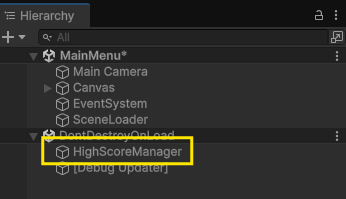
If you play your game, you will now see that when we start our game, our HighScoreManager game object is in a separate section of our hierarchy called Do Not Destroy On Load:
Displaying our High Score
Next, we need to make a script to display our high score. For this, we can make a script called ScoreDisplay.
In this script, we can create a variable to hold a TextMeshProUGUI of our high score. We can then write some code to assign the value of highScore in our HighScoreManager to the text of our high score display on Start:
using UnityEngine;
using TMPro;

public class ScoreDisplay : MonoBehaviour
{

    public TextMeshProUGUI highScoreDisplay;

    void Start()
    {
        highScoreDisplay.text = "HIGH SCORE: " + HighScoreManager.instance.highScore;
    }
}
Lastly, we can drag this script into our scene and assign our high score text object to the variable value of highScoreDisplay in our Inspector:

Getting Score
As a final step for this tutorial, we need to compare the score at the end of our game to our current high score, to do this, we need to edit our Game Manager script. In this script, let’s alter our code right before we load our main menu scene in our PlayerDeath method. Let’s add a line to compare the game score to the high score of our HighScoreManager:
HighScoreManager.instance.HighScoreCheck(score);
public void PlayerDeath()
{
    playerLives--;

    livesDisplay.text = "LIVES: " + playerLives.ToString();

    if (playerLives == 0)
    {
        HighScoreManager.instance.HighScoreCheck(score);
        SceneManager.LoadScene(0);
    }
    else
    {
        Destroy(currentPlayer);
        SpawnPlayer();
    }
}
Now when we play our game we are able to get our score when our player dies and compare that score to our current high score. If you test your game you will notice that your high score updates when you get a new high score.